For iPhone, iPad and Android

Read real Chinese, one page at a time.

Photograph a page of a novel, a textbook or a menu, or paste text from anywhere. Shuye sets it as a lesson: pinyin above the characters, a translation under each sentence, and every word one tap away.

Free to start, with no account needed. Android is coming soon to Google Play.

Try it: tap a word

Pinyin
Characters

。

Every morning I go for a walk in the park.

,。

Lots of older people practise tai chi there, and the air is very fresh.

Tap any word above. Its meaning in this sentence shows here, under the text, the way the app’s word panel does. The page never disappears behind a popup.

From Shuye’s own sample page. Arrow keys step through the words; in the app you swipe the panel.

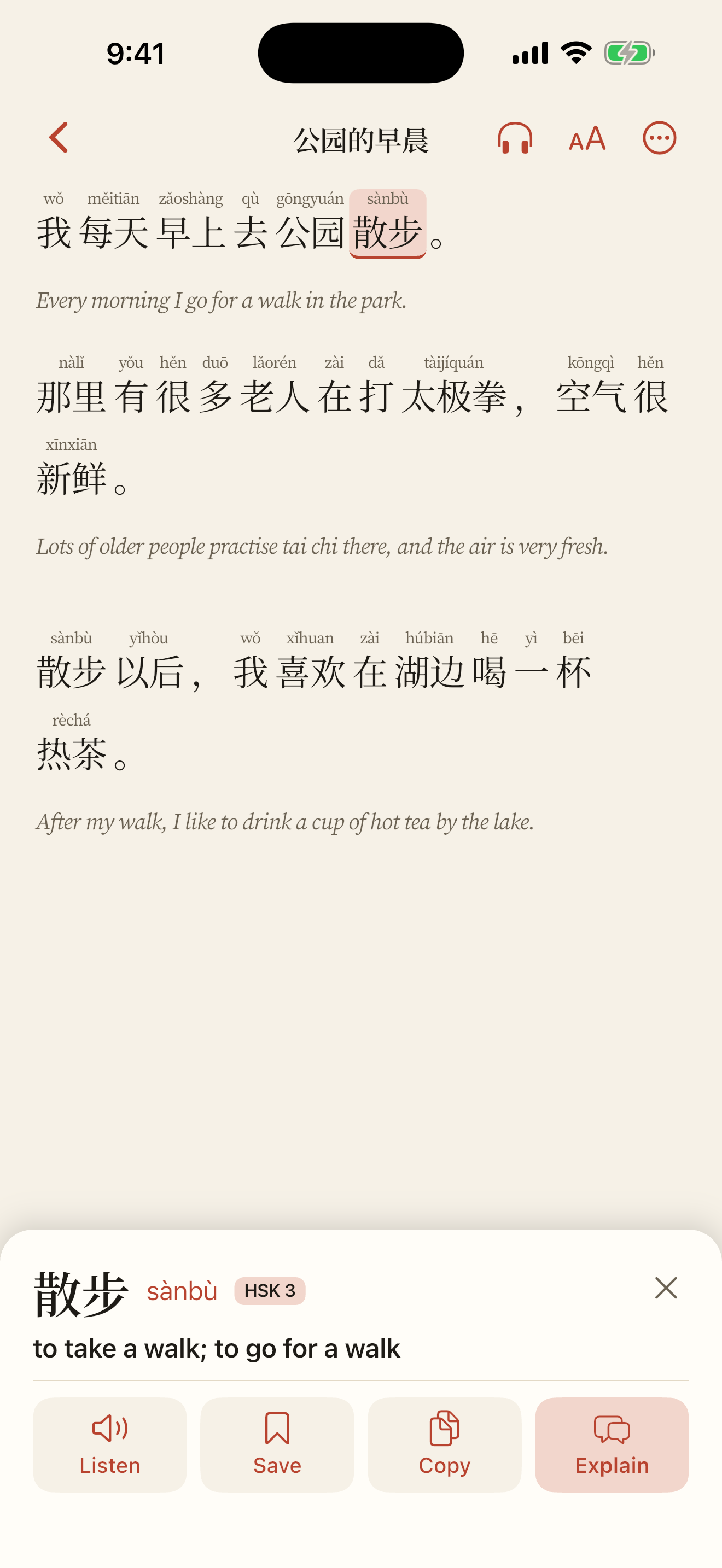
The Shuye reader: Chinese text with pinyin above each word, a translation under each sentence, and a tapped word open in the panel docked below.
Tap a word: its meaning docks under the text.

IHow it works

用法

Capture a page. Read it. Keep what you learn.

  1. Capture

    Scan pages with the camera, pick up to 20 photos, choose pages from a PDF, or paste text. You can also send text, images or a PDF from another app with Send to Shuye. With no connection, pages wait on the phone and go when you’re back online.

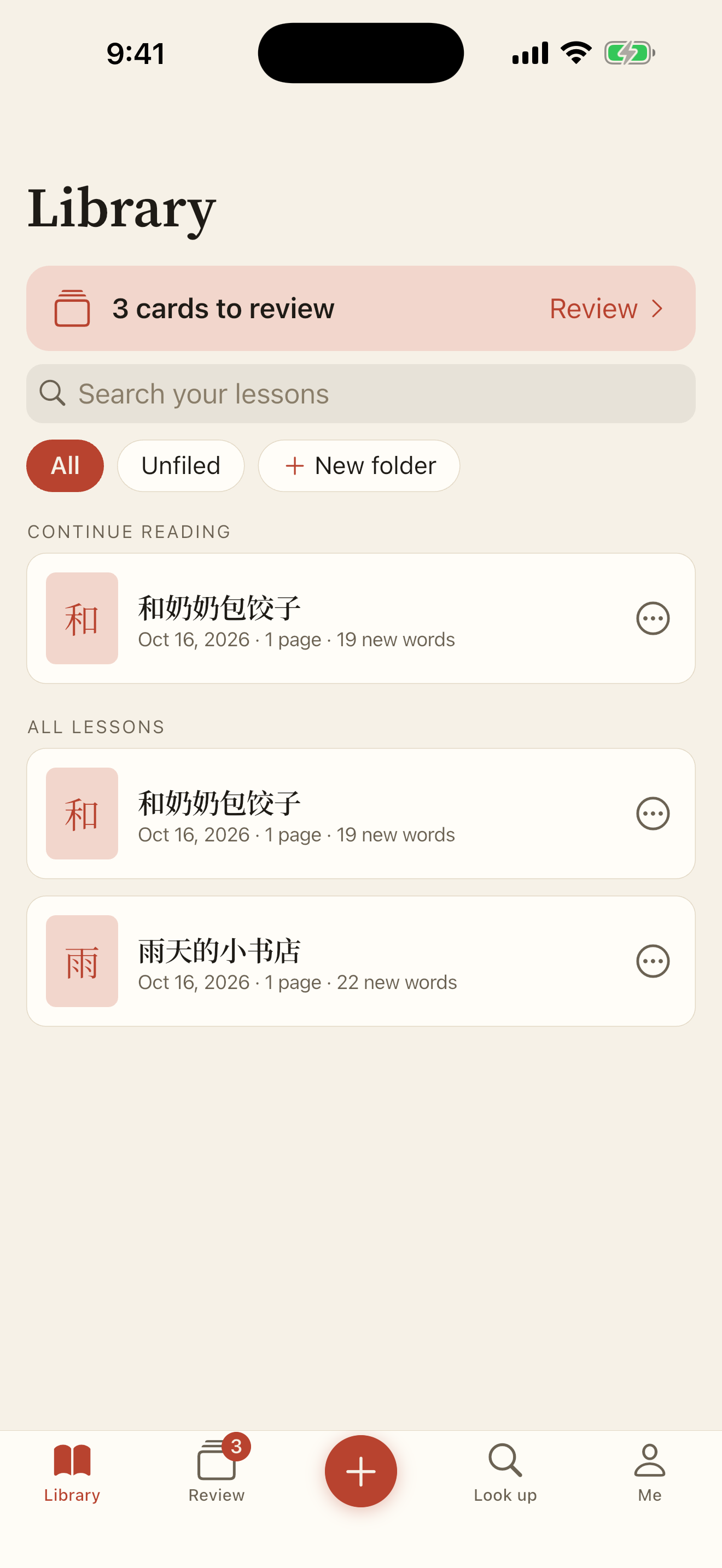
    The Shuye library, listing lessons with their titles and status.
    Your lessons, in the Library.
  2. Read

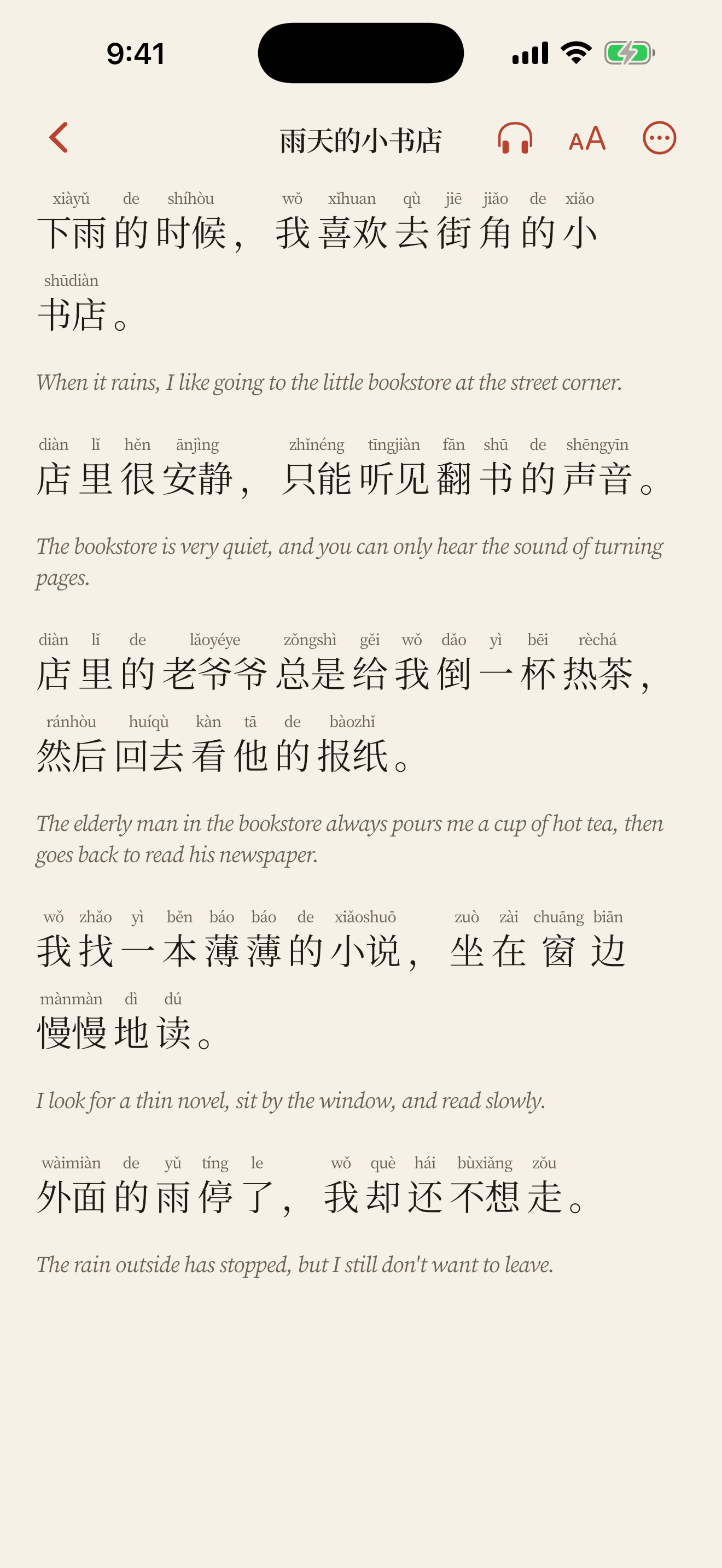
    Each page comes back split into sentences and words, with pinyin, dictionary entries and a translation for every sentence. Tap a word for its meaning here; press and drag to select a phrase.

    A lesson open in the Shuye reader.
    A page, set as a lesson.
  3. Keep

    Save a word and it becomes flashcards, tied to the sentence you found it in. Review a few minutes a day and Shuye brings each word back just before you would forget it.

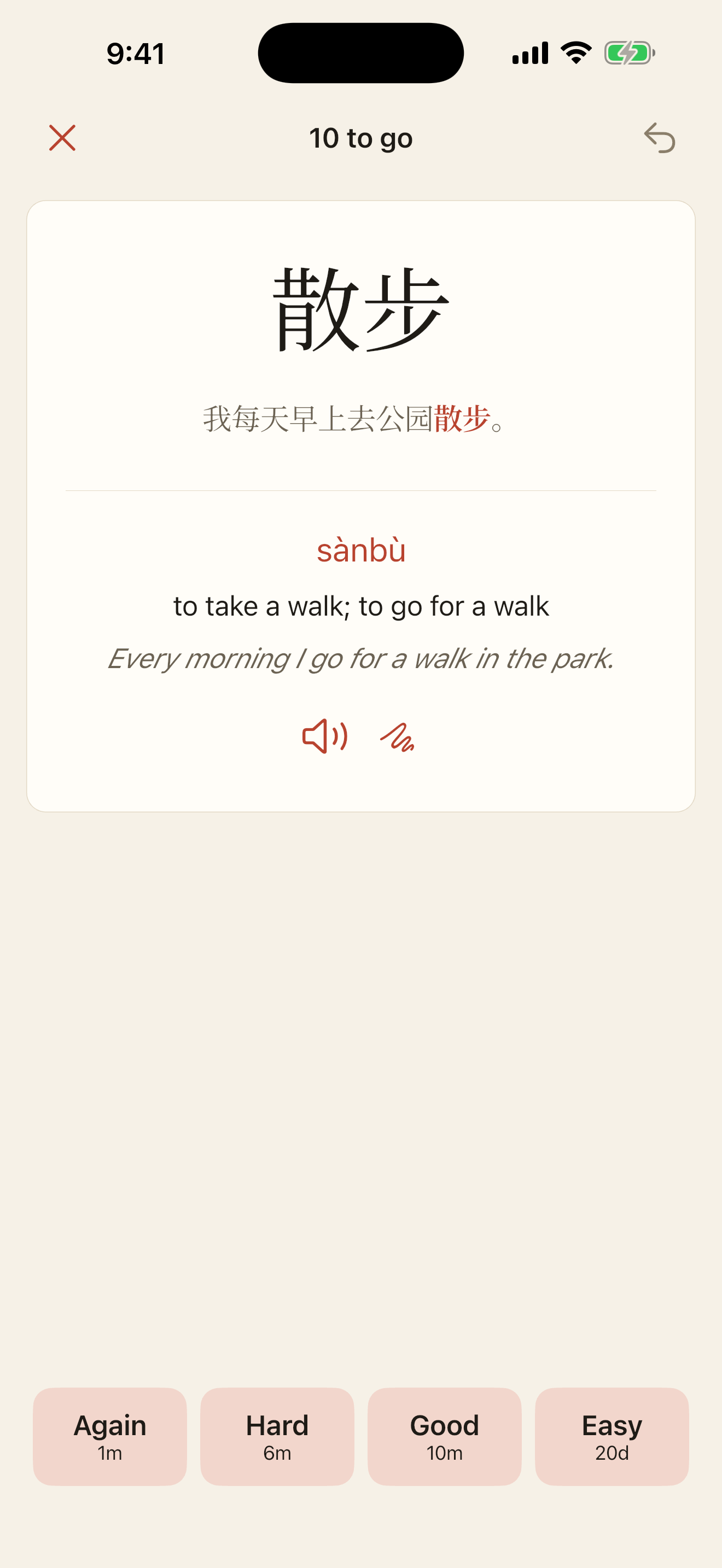
    The Review tab with cards due today.
    Today’s cards, in Review.

IIWhat’s inside

功能

Features

Pinyin

Pinyin where you need it, and nowhere else.

Pinyin sits above the characters, the way it does in a good graded reader. Set it to All, Above my level or Off. Above my level uses the HSK level you choose, so words you already know stand on their own and new ones keep their reading.

Tone colours are there if you want them. The translation under each sentence can be hidden. Simplified or Traditional, whichever the page was printed in, at the flick of a switch.

In the app: Reader → Display

The word panel and Look up

The meaning that fits this sentence, under the text.

Tap a word and a panel docks at the bottom of the screen: the word, its reading and HSK level, the sense that fits this sentence, a short note for words above your level, and the other senses if you want them. Listen, Save and Copy are right there. Swipe the panel to step through the sentence. On iPad it becomes a sidebar.

Look up is the full dictionary, on the phone: search by characters, by pinyin with or without tones (sanbu finds 散步), or in English. It works offline, and each entry shows sentences from your own pages where you met the word.

In the app: Reader → tap a word · Look up tab

The word panel docked under the text, showing a word, its pinyin, its meaning in the sentence and buttons to listen, save and copy.
The panel docks below the page.

Explain

Ask why, and get an answer about this sentence.

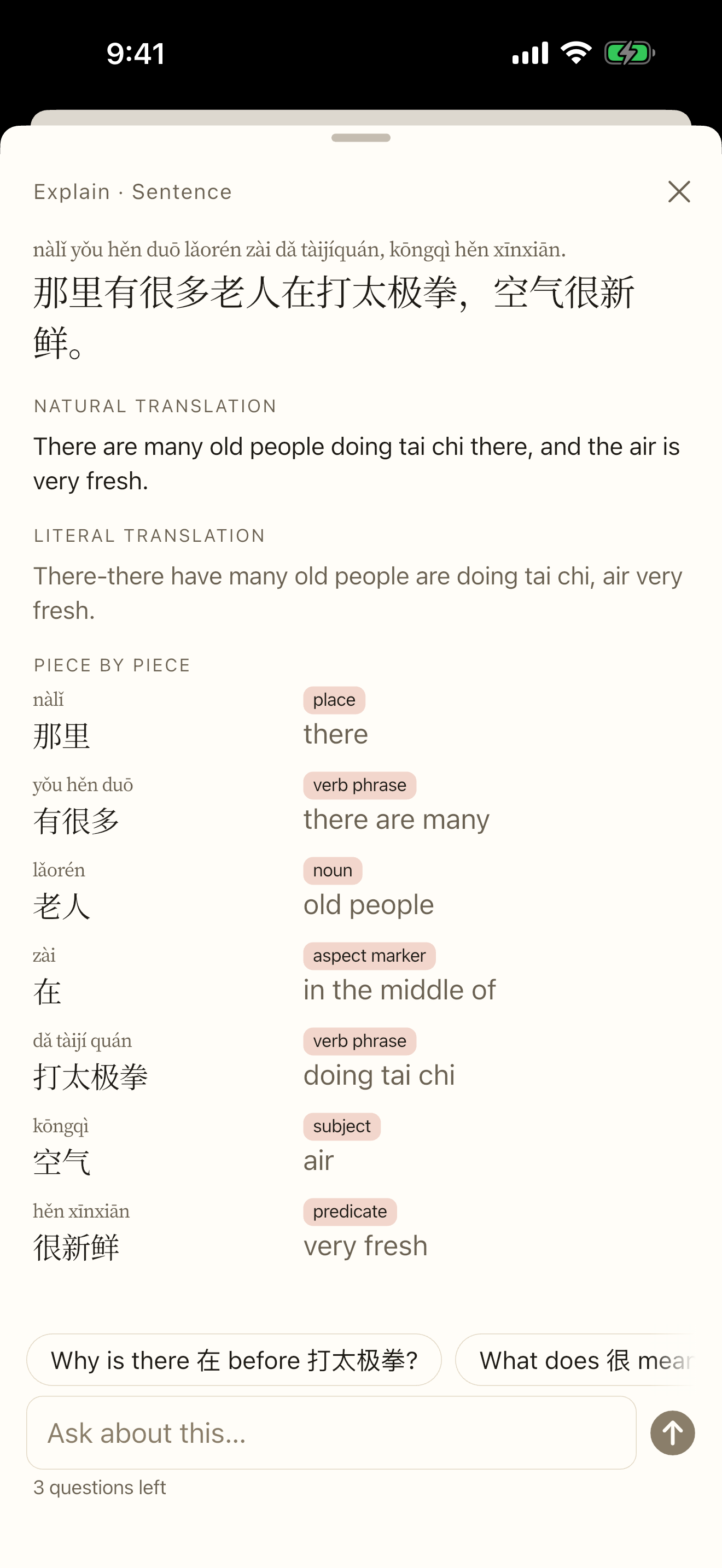
Select a word, a phrase or a whole sentence and tap Explain. For a word or phrase you get what it means here, why it’s used, short grammar notes, its register, two example sentences and related words. For a sentence: a natural translation, a literal one, and a chunk-by-chunk breakdown.

Then ask up to three follow-up questions in plain English. Explanations are saved, so reopening one costs nothing, and a small dot marks the sentence. Pinyin in an explanation comes from the same engine as the reader, not from the AI. The AI can still be wrong, so treat it as a well-read friend, not a final authority.

In the app: word panel → Explain · tap a translation → Explain this sentence

An explanation card for a word, with its meaning in the sentence, grammar notes and example sentences.
An explanation, with follow-up questions.

Listen

Hear the page read aloud, word by word.

Listen reads the lesson with your phone’s own Mandarin voice and underlines each word as it’s spoken. Go back a sentence, loop one, or set the speed from 0.5× to 1.5×. Tap any sentence to start there.

It runs entirely on the phone: it works offline, it has no daily limit, and the text never leaves the device. A Traditional page uses a Taiwan voice when you have one. (Voices that don’t report word timings get the sentence highlighted instead.)

In the app: Reader → Listen

Playing · 1×

那里nàlǐ有yǒu很hěn多duō老人lǎorén在zài打dǎ太极拳tàijíquán,空气kōngqì很hěn新鲜xīnxiān。

Illustration: the sentence being read is tinted and the word being spoken, 太极拳, is underlined.

Flashcards

Cards that come back just before you’d forget.

Every saved word gets a reading card and a recall card, both carrying the sentence you found it in. Scheduling uses FSRS, the open spaced-repetition algorithm, and each answer button tells you when you’ll see the card again. Turn on listening cards if you want to train your ear too.

Add a whole HSK 3.0 level, the new words from a lesson in one go, or import a CSV list or an Anki deck. Card backs show stroke order. Reviews work in airplane mode and sync later, and flashcards are unlimited on the free plan.

In the app: Review tab → Add a deck

HSK 3.0 starter decks
LevelWords
HSK 1505
HSK 2745
HSK 3951
HSK 4970
HSK 51,058
HSK 61,120
HSK 7–95,593
New cards arrive at your daily limit, 10 a day unless you change it.

Progress

A streak that forgives a missed day.

A day counts when you finish a review session, read for two minutes or finish a lesson. Each week forgives one missed day on its own; there is nothing to earn or buy, and no streak notifications.

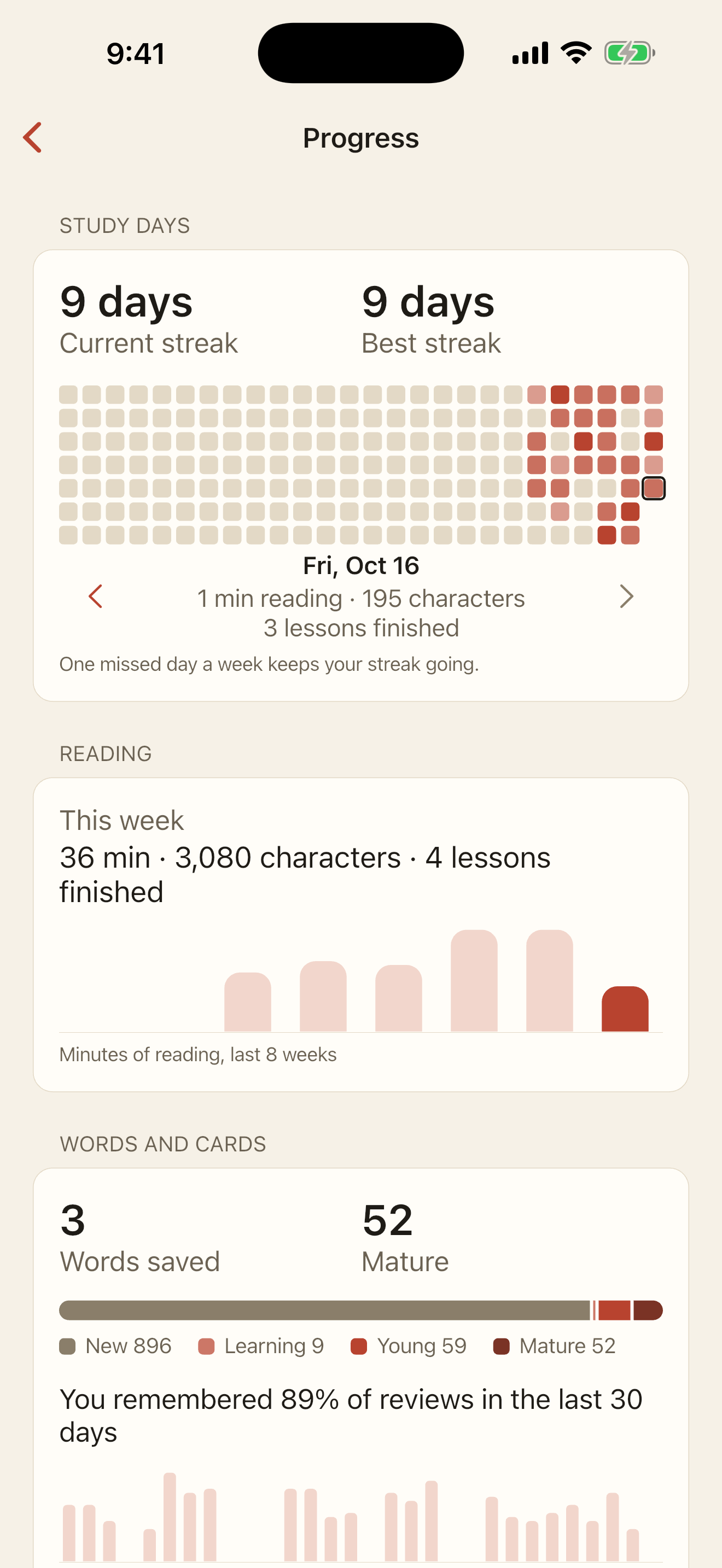
Progress shows a heatmap of your study days, reading time, characters read, cards by stage, how often you remember, and HSK coverage: “You know 62% of HSK 2.” Each Monday a short report sums up your week. It’s all worked out on your phone.

In the app: Me → Progress

The Progress screen with a streak, a heatmap of study days and HSK coverage bars.
Progress: streak, heatmap and HSK coverage.
  • No account to start

    Shuye begins without one. Sign in with Apple or Google when you want your lessons and cards on another phone or tablet. Sign in on a second phone that already has words, and they’re added to your account; where both have the same word, the longer review history is kept.

  • Share a lesson or a deck

    Send a link to a friend or a class. A shared lesson carries the text, never your photos. You can turn any link off in Me → Shared links.

  • Send to Shuye

    From another app’s share sheet, send text, images or a PDF straight into a new lesson.

IIIPricing

价格

What’s free, and what isn’t.

Most of Shuye is free for good. Premium is for the days you want to read more than a few pages.

Free and Premium compared
FeatureFreePremium
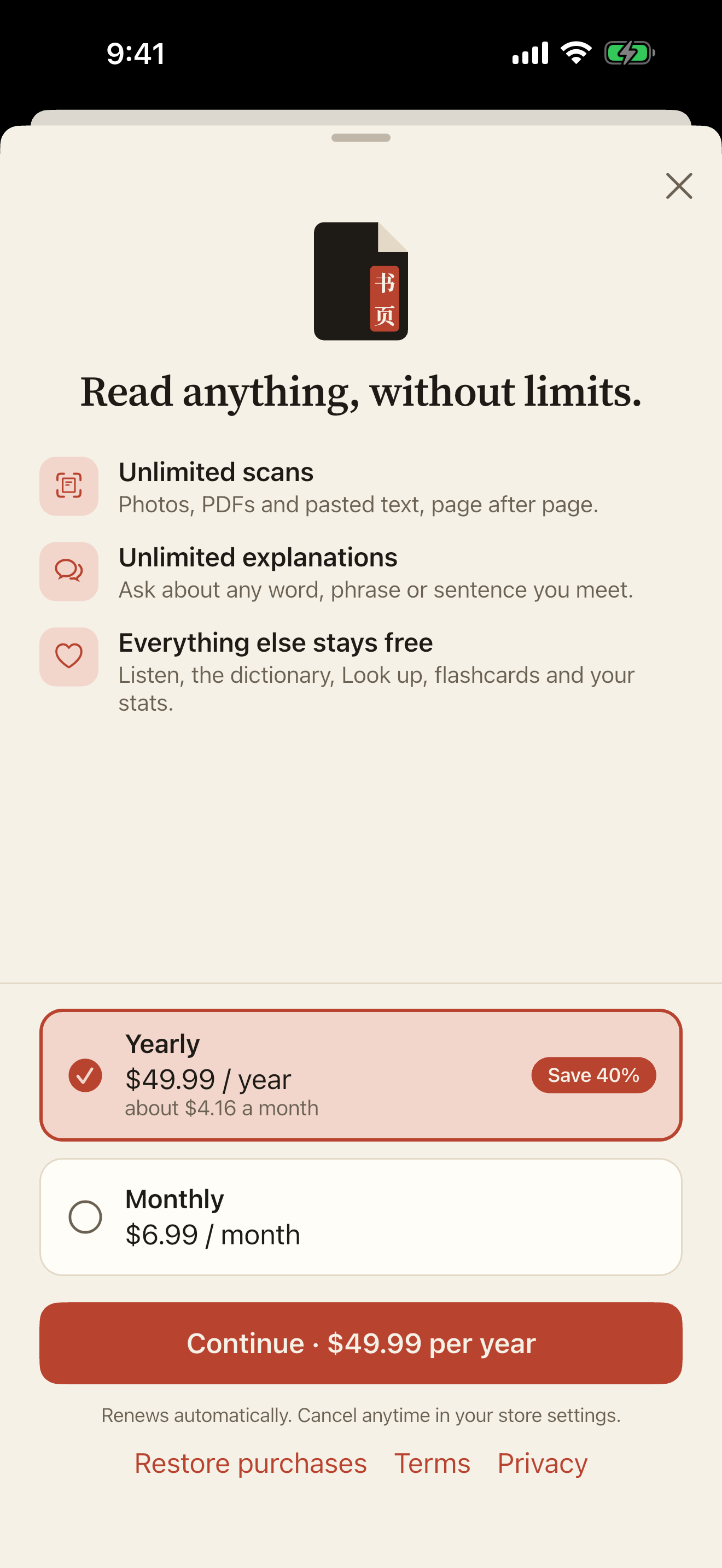
Price€0for good€6.99a month, or €49.99 a year
Scansa photo or PDF page, or up to 1,500 pasted characters3 a dayUnlimited*
Explanationseach with 3 follow-up questions5 a dayUnlimited*
Dictionary taps and Look upUnlimitedUnlimited
Flashcards, HSK decks, stroke orderUnlimitedUnlimited
ListenUnlimitedUnlimited
Progress, sync and sharingIncludedIncluded
  • *Unlimited means normal personal use. A fair-use ceiling, far above what reading takes, stops automated or abusive use. If you reach it, scans and explanations pause until the next day; everything else keeps working.
  • ·There is no free trial. The free plan is the trial, for as long as you like. Free counts reset every day, and reopening a saved explanation is always free.
  • ·Prices are shown in euros. The App Store and Google Play set the price in your country and currency, so it may differ; the app shows the exact price before you buy.
  • ·Premium is billed by Apple or Google and renews automatically until you cancel in your store settings. It belongs to your Shuye account, so you sign in before buying and it follows you to your other devices.
The Shuye Premium screen with yearly and monthly plans.
The Premium screen in the app.

IVQuestions

问答

Questions, answered plainly.

Anything else? Write to us.

Does Shuye work offline?

Mostly. The dictionary and Look up live on your phone. Lessons you’ve opened stay readable, flashcard reviews work in airplane mode and sync later, and Listen uses the phone’s own voice.

Reading a new page and Explain need a connection, because that work happens on our server. Pages you capture offline wait on the phone and are sent when you’re back online.

Simplified or Traditional characters?

Both. On first launch you choose Simplified, Traditional, or “as written on the page”, and you can switch any lesson between the two. Shuye detects which one a page was printed in. Explanations follow the characters you read, and Listen picks a voice to match.

Shuye is for Mandarin. Explanations are written in English.

What happens to the photos I take?

A page photo is uploaded to private storage that only your account can reach. Our server sends it to Google Cloud Vision to find the text, then works with the text alone: only text goes to OpenAI for translation and explanations, never the photo.

The photo is kept so you can look at the original page, and it’s deleted when you delete the lesson or your account. Shared links never include photos. The Privacy Policy has the details.

Do I need to sign in?

No. Shuye creates an anonymous account on first launch, and everything works without signing in. Sign in with Apple or Google when you want to back up your lessons and cards, use them on more than one device, or buy Premium.

Without signing in, your data is tied to that phone’s install: if you delete the app, you can’t get it back.

How many pages can I read for free?

Three scans a day: a photo or PDF page is one scan, and pasted text costs one scan per 1,500 characters. If a page can’t be read, the scan is given back. Pages you add after the limit wait and are read when it resets.

Can I bring my Anki deck?

Yes. Import an .apkg exported with “Support older Anki versions” ticked, or a CSV list of words. Shuye fills in missing readings and meanings from its dictionary. Words come in as new cards; Anki review history isn’t imported.

How do I delete my account?

In the app: Me → Account → Delete account (or Delete my data if you never signed in). It removes everything on our servers, photos included, straight away. Step-by-step instructions, and an email option, are on the Delete account page.

Shuye is on the App Store, and coming soon to Google Play.